
Azure API Management as integration hub: one gateway, multiple systems
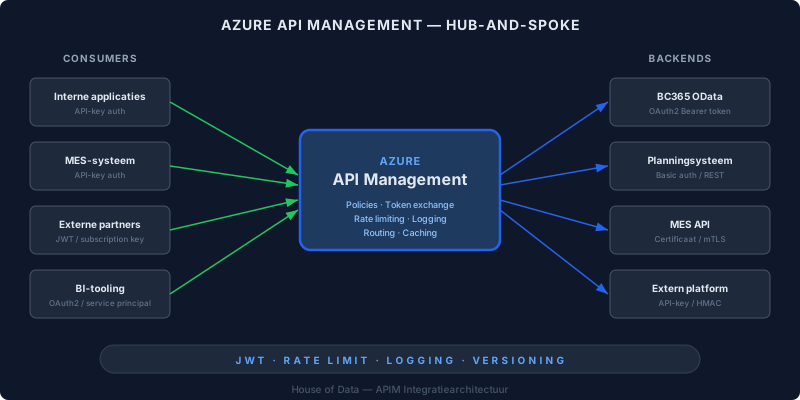
A manufacturing company with five systems exchanging data. The MES system talks to Business Central. The planning system fetches orders from BC365. The BI tooling pulls data from three sources. External partners submit inventory data via an API.
Each of those integrations has its own authentication mechanism, its own URL structure, its own error handling and its own retry logic. Those aren’t five integrations: those are five points of failure, five places where you manage credentials, five places where you have no visibility into what’s passing through.
This is the classic point-to-point problem. And it doesn’t scale.
From spaghetti to hub-and-spoke
The solution isn’t a better integration. The solution is an architectural change: put Azure API Management (APIM) at the centre as an integration hub.
In a hub-and-spoke model, consuming systems no longer talk directly to backend systems. They talk to APIM. APIM translates, authenticates, logs and routes. The consuming side sees one uniform API. The backend side stays unchanged.
In practice:
- The MES system sends a request to APIM with an API key
- APIM validates the key, exchanges it for an OAuth2 Bearer token at BC365, and forwards the request
- BC365 receives a standard OAuth2 request and responds
- APIM receives the response, logs it, and returns it to the MES system
The MES system doesn’t need to know about OAuth2. It doesn’t need to implement token refresh, manage client secrets or maintain a token cache. APIM handles that.
The OAuth translation problem
This isn’t a theoretical example. We see this pattern regularly at manufacturing companies.
A production automation system supports only API-key authentication. Simple, reliable, but not compatible with BC365’s OAuth2 flow. Without an intermediary layer, you have two options: modify the source system (expensive, risky) or build custom middleware (maintenance burden).
With APIM, you configure this in a policy (an XML configuration block applied to the inbound request):
- Validate the source system’s API key
- Use a
send-requestpolicy to obtain a Bearer token from Azure AD - Cache the token (so you’re not requesting a new token on every call)
- Set the token as the
Authorizationheader on the forwarded request
This isn’t code you deploy. It’s configuration you manage in the Azure Portal or via Infrastructure as Code. No separate service, no extra compute, no deployment pipeline.
What you configure
Per API in APIM, you configure:
- Backend URL: where the request is forwarded to (e.g.
https://api.businesscentral.dynamics.com/v2.0/...) - Authentication method: OAuth2, API key, certificate, managed identity
- Rate limits per consumer: the planning system gets 100 calls per minute, the external partner gets 20
- Allowed HTTP methods: the BI tooling may only GET, the MES system may GET and POST
- Policies: transformation logic, header manipulation, caching, retry configuration
- Logging: every call is written to Application Insights
Policies are the power of APIM. They work as a pipeline: inbound (before the request goes to the backend), backend (the actual request), outbound (before the response goes back) and on-error. At each stage you can add headers, transform payloads, apply conditional logic or block requests.
Monitoring as a byproduct
This is the underappreciated benefit of a central gateway: when all traffic flows through a single point, you automatically have a complete audit trail.
With Application Insights as the logging backend, you see per API call:
- Latency: how long the full roundtrip took
- HTTP status code: successes, client errors, server errors
- Consumer identity: which system or partner made the request
- Payload size: how much data went back and forth
- Failure patterns: which backend fails most often, at what times
You don’t need to build this separately. It’s a byproduct of the architectural choice. The moment you set up APIM, you have monitoring.
In practice, this means you can answer questions that were previously impossible: “How many calls does the planning system make to BC365 per day?” or “What’s the average response time of the MES endpoint?” or “Which partner is structurally exceeding their rate limit?”
When APIM is overkill
APIM isn’t suitable for every situation. If you have two systems with a stable, point-to-point integration that’s been running for years, leave it alone. The overhead of a gateway only justifies itself with three or more integrations, or with connections where authentication, logging or rate limiting is a requirement.
But the moment you find yourself implementing the same OAuth logic for the third time, or realizing you have no visibility into which system calls which API how often: you don’t have an API problem. You have an architecture problem. And APIM is the answer.