
Why your Azure costs explode with realtime reporting
“The costs for our data pipeline are a multiple of what we budgeted.”
That was the message during an escalation meeting at a manufacturing company where we manage the Azure data platform. The cause? The data platform had been set up as a lift-and-shift of the existing on-premise architecture. That works for a daily batch, but not for near-realtime reporting. On-premise architectures run on local storage where I/O is virtually free. In the cloud, you pay for every read and write operation. With I/O-intensive workloads like frequent data processing, those costs add up fast.
How it went wrong
The architecture was a classic lift-and-shift: the on-premise data processing was moved to Azure virtually unchanged. Data from Business Central flowed via BC2ADLS to a Fabric Lakehouse, was processed through Synapse pipelines, and consumed by a BI tool for management reporting. For a daily batch, this worked fine.
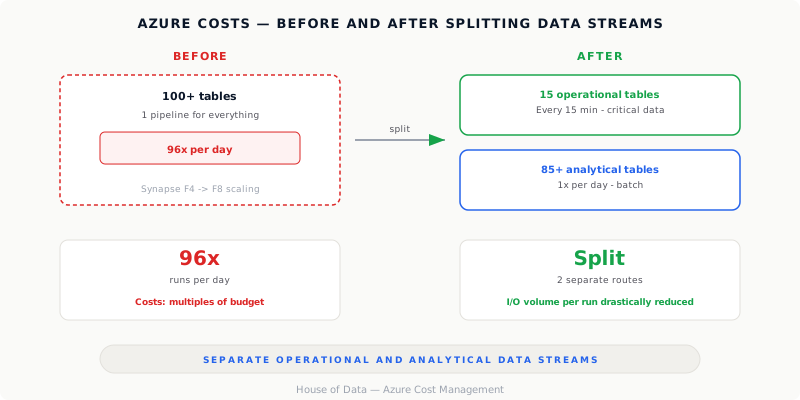
But when the business needed three operational reports with data refreshed every few minutes, the model broke. An architecture that was no problem on-premise (local disk I/O is practically free) became a cost driver in the cloud. The same pipeline now had to run 96 times per day instead of once. And the data volume turned out to be far more than expected: not 8 tables via an OData feed as originally planned, but 100+ tables via BC2ADLS. Each run meant thousands of read and write operations, and in the cloud you pay for every single one.
Where the costs come from
With Synapse and Fabric, you pay for compute capacity and I/O. A lift-and-shift doesn’t account for this: on-premise, I/O runs on local disks with no meter running, but in the cloud every operation counts. The Fabric capacity that was perfectly adequate for a daily batch was exhausted within a week when we moved toward realtime. Scaling up was necessary just to keep things running.
The costs sit in three layers:
- I/O intensity: each pipeline run reads and writes large amounts of data. What was invisible on-premise is a direct cost driver in the cloud. At 96 runs per day instead of 1, that adds up fast.
- Fabric capacity: capacity units are shared across all workloads. More I/O processing = more capacity needed = higher SKU.
- Data volume: 100+ tables contain significantly more data than the original 8. More data = longer processing time = more I/O = more capacity consumption.
What we did
First: remove the panic with hard data. We analyzed the Synapse tables, Azure cost analysis, and pipeline runs, then wrote a briefing with two versions: a technical one and one for management.
Then we dissected the data flow. Of the 100+ tables being processed every run, only about 15 were actually needed for the operational reports. The rest was analytical data that could stay on a daily schedule. By separating those two streams (frequent for the critical tables, daily for the rest), the I/O volume per run dropped dramatically. On top of that, we implemented technical optimizations in the processing layer that cut cycle time in half.
The lesson
Realtime reporting is always technically possible. The question is what it costs and whether the business case justifies it. A lift-and-shift of an on-premise architecture to the cloud works for simple batch workloads, but with I/O-intensive scenarios like near-realtime processing, costs spiral out of control.
Three things you can do:
- Calculate before you start. Not just compute costs, but also the data volume flowing through the pipeline. Ask your BI vendor exactly which tables they need.
- Separate operational and analytical data streams. One pipeline for everything is simple but expensive. Two optimized routes are cheaper and more reliable.
- Monitor from day one. We now actively monitor row counts per table and processing times. We get automatic alerts when anomalies occur, before the invoice arrives.
The cloud promises scalability. But a lift-and-shift without rearchitecting your data platform doesn’t deliver scalability, just a higher bill.