From Looker PDTs to dbt: How We Restructured a Data Warehouse
“We have 47 Persistent Derived Tables in Looker. Nobody knows what they all do anymore.”
That was the situation at a major retailer with a hub & spoke data warehouse in BigQuery. Looker served as the reporting tool, but had gradually become the transformation layer too. PDTs building on PDTs, building on more PDTs. A chain of dependencies that nobody could oversee.
The problem with PDTs as a transformation layer
Looker PDTs are powerful for quick prototypes. But when you build an entire data warehouse on them, you run into fundamental limitations:
- No version control: changes go live immediately, without review or rollback
- No tests: you only discover errors when a dashboard shows strange numbers
- No documentation: logic is hidden inside LookML files
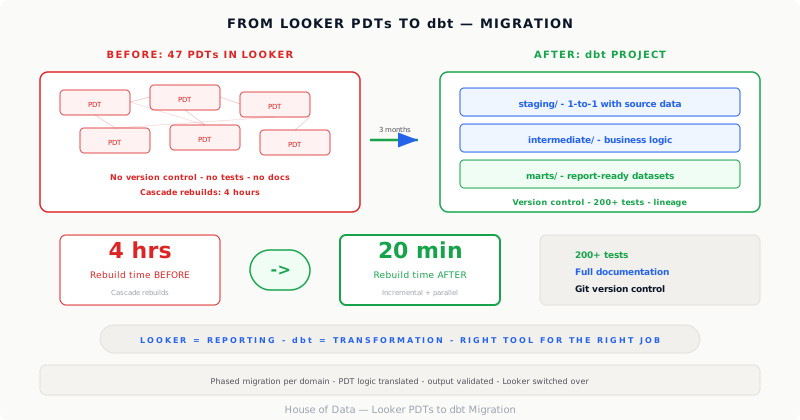
- Cascade rebuilds: one change triggers a chain of rebuilds that can take hours
- No lineage: you can’t trace which source data ends up in which report
The approach: phased migration
We didn’t flip everything at once. Instead, we chose a pragmatic, phased approach.
Phase 1: Inventory and classification
First, we mapped and classified all PDTs:
- Staging: direct transformations on source data
- Intermediate: business logic and joins
- Marts: end products for reporting
This gave us, for the first time, a clear picture of the data flow.
Phase 2: Set up the dbt project
A clean dbt project in BigQuery with a clear folder structure:
models/
  staging/:      1-to-1 with source data
  intermediate/: business logic
  marts/:        report-ready datasets
Each layer has its own schema tests and documentation. Not as a luxury, but as a baseline requirement.
Phase 3: Migration by domain
Domain by domain, we migrated PDTs to dbt models. Per domain:
- Translate PDT logic to dbt SQL
- Write tests validating output against the existing PDT
- Switch Looker to the dbt table
- Disable the PDT
Phase 4: Optimization
With transformations in dbt, we could optimize what wasn’t possible in Looker:
- Incremental models: only process new or changed data
- Materialization strategy: choose between table, view, or incremental per model
- Parallel processing: dbt understands the dependency graph and maximizes parallelism
The result
After three months, the migration was complete:
- Rebuild time from 4 hours to 20 minutes: thanks to incremental models and parallelization
- 200+ tests: every morning we know the data is correct before the business opens a dashboard
- Full documentation: automatically generated from dbt, including lineage graph
- Version control via Git: every change reviewable, testable, reversible
But the most important result was less visible: the team trusted the data again. No more “is this number right?” debates in the weekly meeting.
The lesson
Tooling isn’t the problem. The problem is when a tool is used for something it wasn’t designed for. Looker is brilliant as a reporting tool. But it’s not a transformation platform.
The power of dbt isn’t in the SQL; that’s the same. The power lies in the engineering practices it enforces: tests, documentation, version control, modular design. Those aren’t nice-to-haves. That’s the difference between a data warehouse you trust and one you fear.
Is your organization struggling with unmanageable data transformations? Get in touch. We’d love to help with a structured approach.